
 Aidanta
 ShopifyProduct, order and shipping information
 PlentyONEOrders, tracking, plentyShop login
 WooCommerceProduct data from your WordPress shop
 WordPressKnowledge from your pages and posts
 TelegramHandle website chats via Telegram too
AI advice and customer service for WordPress
Your WordPress site is always open.Now so is your advice.
Aidanta answers questions about your products and services using the content of your WordPress site. When a visitor needs personal help, your team takes over the same conversation with its full history.
WooCommerce integration planned

Answers from your pages
Aidanta learns from the pages and posts of your WordPress site and from your documents — and answers right where your visitors ask.
How Aidanta learnsHelp buyers decide
With your product feed, the chat can show suitable items with image, price and link.
Explore product adviceStep in personally
When your team is needed, it takes over the conversation — history included.
Explore the workspaceOrder information planned
As with Shopify and PlentyONE, Aidanta is set to answer questions about orders, payment and shipping as well.
Integration statusYour pages and posts become knowledge.
Aidanta reads your WordPress site as a knowledge source: services, shipping and return terms, opening hours, guides. If you like, it refreshes this knowledge regularly, and documents such as catalogs or price lists come on top.
You review good answers from conversations and save them as knowledge for future chats.
From one question to the right selection.
Aidanta uses your product feed to advise visitors and, if you like, shows suitable items with an image, price and product link directly in the chat. It finds them even when visitors ask in their own words.
With the planned WooCommerce integration, prices, variants and stock are to come live from your shop.
Fits your WordPress site just as it is.
Shop, service provider or association: Aidanta fits into your existing site. Typical questions from WordPress site owners — and the answers.
Today you paste the snippet from the portal once — with a plugin for custom scripts, no theme file needs editing. A dedicated Aidanta plugin is planned.
The chat window sits on top of your page, takes up no space in the layout and brings its own look — whether you use the block editor, Elementor or another page builder.
The snippet is the same for every visitor and the chat window builds itself in the browser — cached pages show it as usual. If an optimization plugin combines, minifies or delays scripts, exclude the snippet.
With WPML, Polylang or no translation plugin at all: Aidanta replies in your visitors’ language, and your team reads along in its own.
Before the first chat, the window asks for consent itself — with a record and the option to withdraw. It recognizes Cookiebot and Usercentrics directly; other banners can be connected.
Then Aidanta answers questions about your services, prices and processes, and takes inquiries when your team isn’t available.
Planned: WooCommerce integration
Soon: order questions resolved right in the chat.
As with Shopify and PlentyONE, Aidanta is set to retrieve order, payment and shipping information directly from your WooCommerce — via a dedicated WordPress plugin and only after an identity check.
The integration is being planned. We’ll announce its progress under News.
PlannedOne shared workspace for your support team.
Follow your chatbots’ conversations in one central overview. Take over chats yourself, hand off to colleagues and keep internal notes.
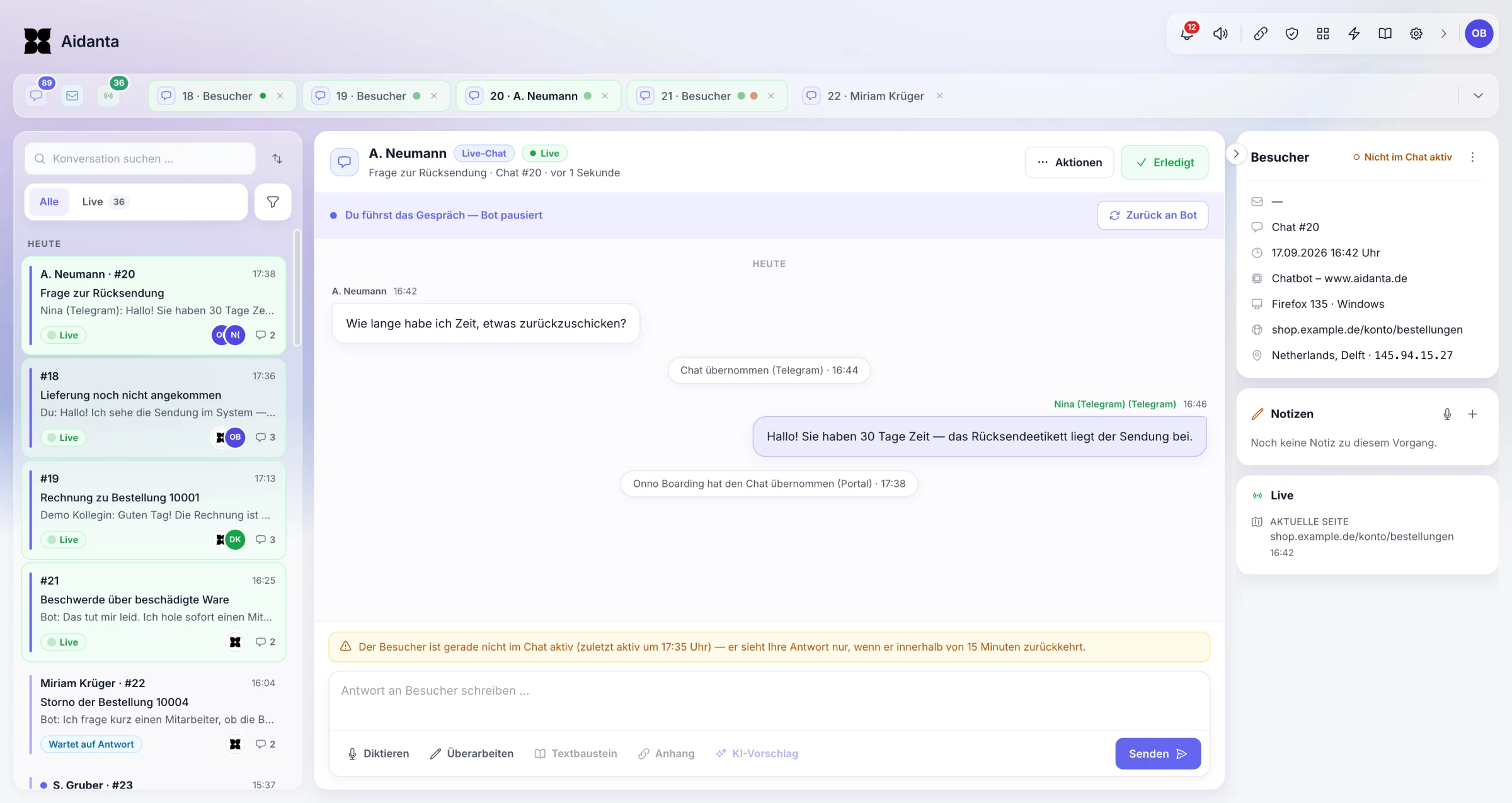
Shared history, clear ownership
Take over, hand off to colleagues, hand back to the AI.
Multiple chats at once
Open, ongoing and follow-up conversations in tabs.
Translate, dictate, rewrite
Make replies shorter, friendlier or more formal — your team decides.
Visitor context at a glance
Current page, device, browser, language and location — plus details picked up from the conversation, such as order numbers.
Optionally handle website chats via Telegram too.
Your own chatbot in just a few steps.
- Create a chatbot in the portal and add your WordPress site as a knowledge source.
- Add a product feed as a CSV file if you like — for example from a feed plugin.
- Paste the snippet from the portal once — in your theme’s footer or with a plugin for custom scripts.
- Test with typical questions, activate and follow the conversations.
Planned: a dedicated WordPress plugin that replaces the snippet and brings the WooCommerce integration with it.
Request a demo for my WordPress siteStart small, grow with your shop.
Your plan includes AI credits. You can track usage in the portal and top up credits whenever you need more.
- Starter
- €50 / month
- Professional
- €150 / month
- Business
- €500 / month
- Corporate
- Custom
Credits don’t correspond to a fixed number of conversations. Translation, knowledge processing and text rewriting can use additional credits.
PricingCommon questions
Not yet — a dedicated plugin with WooCommerce integration is planned. Until then, you add the chat window with a short snippet; you can already use website content, documents and product feeds today.
Not yet. Order information, customer accounts and live data from WooCommerce come with the planned integration. We’ll announce its progress under News.
A CSV file with product title and product link, ideally with image, price and description using Google Shopping column names. Many feed plugins for WooCommerce create one. Aidanta doesn’t read XML feeds at the moment.
No. Even without a shop, Aidanta answers questions from your pages and documents and takes inquiries when your team isn’t available.
Yes. Aidanta shows products with image, price and product link from Shopify, PlentyONE or your product feed, and guides customers to matching categories, filters or configurators. Variants and availability are included where your source provides them.
Yes. Your team takes over the conversation in the support workspace with the history so far, can pass it on to colleagues and hand it back to the AI.
From your product data, your website, uploaded documents and regularly retrieved files such as price lists. Your team can pick good answers from conversations and save them as knowledge.
Aidanta keeps answering whatever can be answered from your data. If a customer wants to hear back, the chat collects the necessary details and keeps the request visible for follow-up.
Every plan includes monthly AI credits. Replies, translation, knowledge processing and text rewriting use credits — so a fixed number of conversations isn’t guaranteed. You can check your usage in your account at any time and top up credits when needed.
Let us show you Aidanta on your WordPress site.
Tell us about your website and what you offer. We’ll prepare a demo based on your typical customer questions.
 Aidanta